IPA Signing with Sideloadly
Table of Contents
In Apple’s closed ecosystem, arbitrary code execution is the first wall we hit. Historically, we relied on jailbreaks to audit applications, but in corporate environments or with latest-generation devices (where a stable jailbreak might not exist), we need to adapt.
This is where Sideloading comes in. Essentially, we abuse Apple’s Free Developer Account functionality to sign our own applications (or modified third-party apps) and deploy them to the target device. While tools like AltStore exist, today we focus on Sideloadly, a Swiss Army knife that not only signs but facilitates on-the-fly dynamic library injection (.dylib / Frida Gadgets).
🚧 Environment Preparation
Before opening the tool, there is a critical “gotcha” that often frustrates beginners. Sideloadly needs low-level communication with the iOS device to install the profile.
If you have iTunes or iCloud installed from the Microsoft Store, Sideloadly will fail. Store versions are “sandboxed” and do not expose the necessary libraries for third-party tools to interact with the device daemon.
Cleanup Steps
Completely uninstall any trace of iTunes or iCloud coming from the Microsoft Store.
Download and install the “Standalone” versions (classic
.exeor.msiinstallers) from Apple’s website, I’ll leave them here for you:
Note: Sometimes, a reboot after uninstalling the Store versions saves headaches.
🎭 Identity Management
To sign an application, Apple demands a valid Apple ID. When using a free account, Apple generates a development certificate valid for 7 days and a profile associated with your device.
Security Recommendation: Never use your personal Apple ID (where you keep your photos, cards, or real data) for auditing or research tasks.
Create a “Burner” account dedicated exclusively for testing.
This isolates any risk if Apple decides to flag the account for unusual activity (like repeatedly signing modified IPAs).
⚙️ Configuration and Signing
With the device connected via USB and recognized by iTunes, we open Sideloadly. The interface is minimalist, yet powerful.
Loading the Target
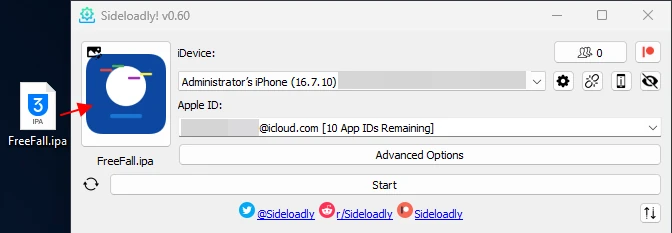
We drag the .ipa file we want to audit. This could be a decrypted application (obtained via frida-ios-dump or similar) or a custom app.
Advanced Options
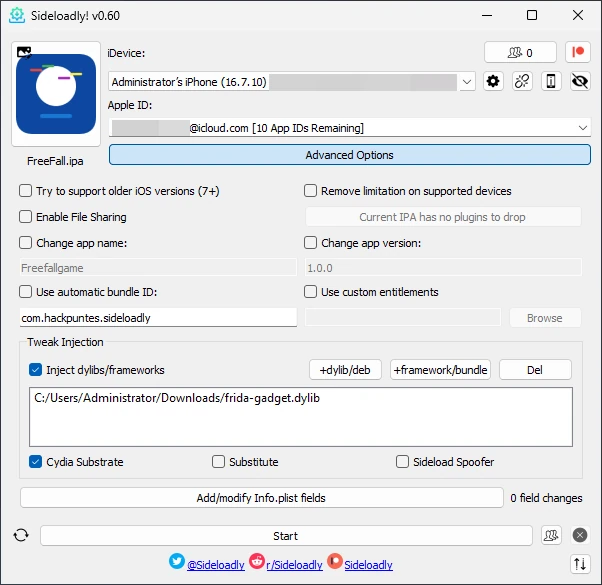
This is where we differentiate a basic install from a technical one. By clicking on “Advanced Options”, we can manipulate how the app is signed:
Change App Name / Bundle ID: Crucial if you want to install the modified app alongside the original one (side-by-side) without overwriting it. By adding a suffix to the Bundle ID (e.g.,
com.target.app->com.target.app.audit), iOS will treat it as a distinct application.Injecting Dylibs: If the IPA doesn’t have the Frida Gadget injected yet, we can do it right here. Select the Frida
.dylib, and Sideloadly will package and sign it along with the main executable.
You can find the
.dylibin the Frida repository, usually namedfrida-gadget-<version>-ios-universal.dylib.xz.
The Anisette Process
Upon hitting “Start”, Sideloadly contacts Apple’s servers (simulating a Mac or legitimate iTunes client via Anisette data) to obtain the certificate. It will ask for our burner account password.
If you have 2FA enabled (almost mandatory nowadays), it will request the code.
🔥 Trust and Execution
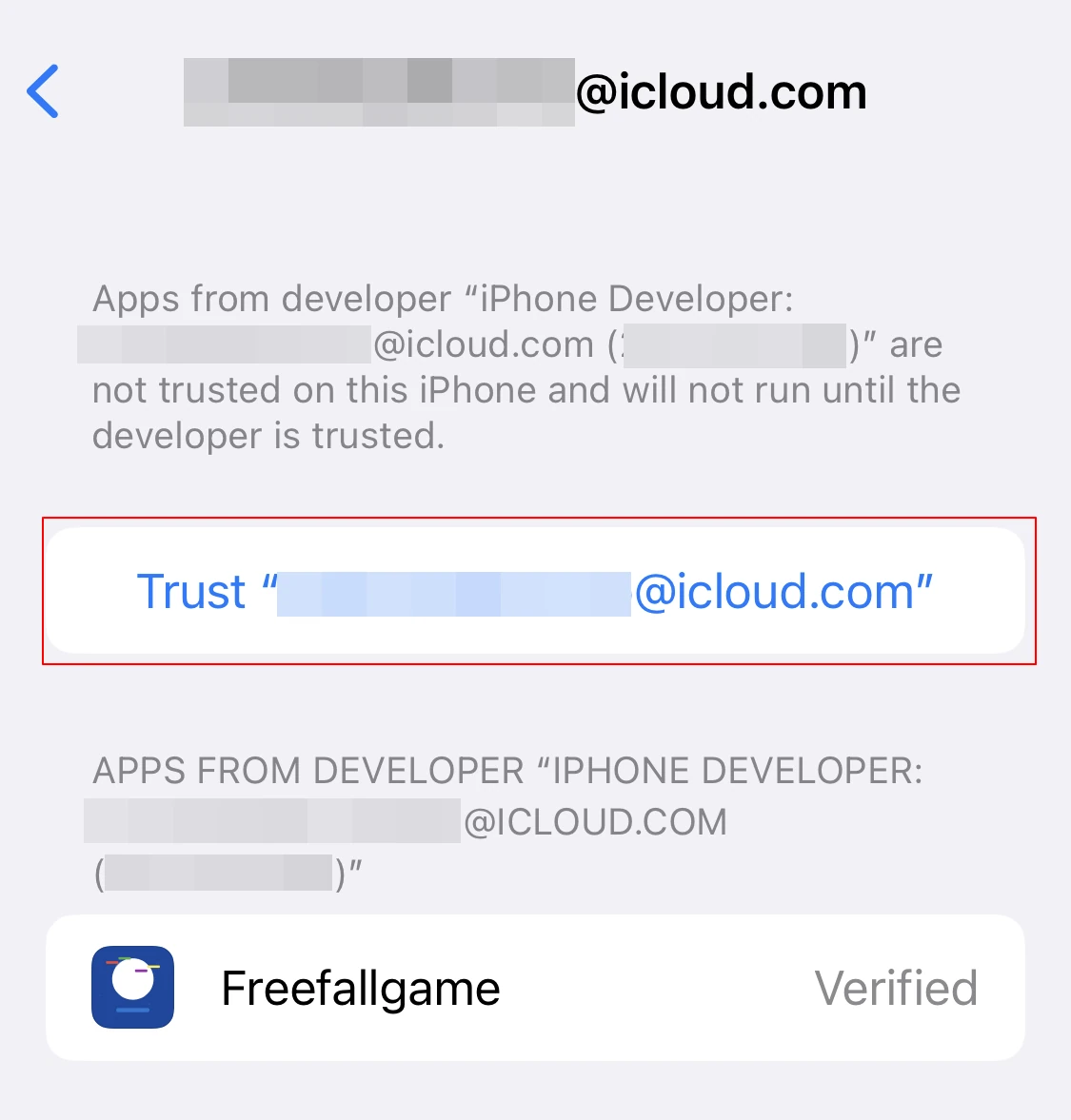
Once Sideloadly shows “Done”, the app will appear on the iPhone’s Springboard (home screen). However, if you try to open it, iOS will block execution. This is the Walled Garden security model in action: the certificate is cryptographically valid, but the user hasn’t expressed explicit trust in it.
To authorize execution:
Go to Settings -> General -> VPN & Device Management (or Profiles).
You will see your burner account email under “Developer App”.
Enter and tap on “Trust”.
Now, the signed binary is executable, and if you injected Frida, it will be ready to hook as soon as the application launches.
Conclusion
Sideloadly vastly simplifies the deployment of test applications on iOS devices. While the 7-day limitation might seem annoying, it’s usually sufficient time for a pentesting engagement. Maintaining operational hygiene by separating accounts and environments ensures our testing remains controlled and repeatable.
See you next time!